
UMR | Health
UNITED HEALTHCARE SERVICES, INC.Medical
4.4225.00 Reviews
- Version
- 2.34.0
- Installs
- 100.00K
- Age Rating
- Everyone
Screenshots
Our Review of UMR | Health
 Analysis by Appyee
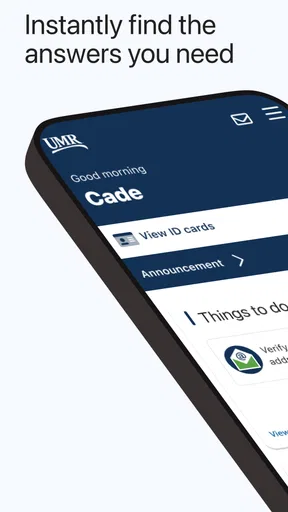
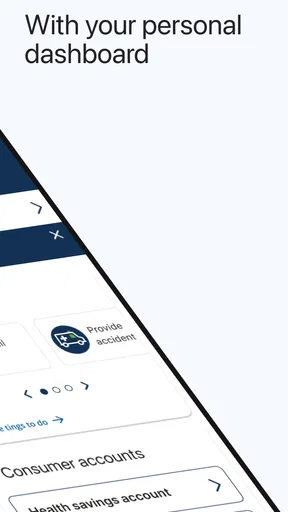
I approached UMR | Health as the kind of app you open when health coverage becomes a practical problem rather than something you want to browse for fun. It is a free medical app from UNITED HEALTHCARE SERVICES, INC., built around the idea of keeping your benefits available while you are away from a desk. My main question was simple: does it make dealing with a UMR health plan easier in everyday situations, or is it just another place to look at information you already have elsewhere?
My answer is fairly positive, with an important condition: this app makes the most sense for people whose health benefits are connected to UMR. It is not a general wellness tracker, symptom checker, appointment marketplace, or replacement for professional medical care. Its value comes from putting plan-related information within reach when you need to make a healthcare decision, check your coverage, or prepare for a conversation with a provider.
How I would decide whether UMR | Health is worth installing
The first decision point is not the interface; it is relevance. If your employer or health plan uses UMR, having a dedicated mobile place for benefit information can remove a surprising amount of friction. If you are looking for medication reminders, exercise tracking, mental-health exercises, or a broad medical reference library, this is the wrong category of app. Installing it will not turn a benefits account into a complete personal health record.
I would also consider how often you deal with healthcare away from home. A benefits app is most useful before a visit, during a billing question, or when you are trying to understand what your plan may cover. Someone who rarely needs to check plan details may open it only occasionally, but that does not make it useless. In fact, occasional-use apps can be valuable when they save you from searching through paperwork at exactly the wrong moment.
There is also a privacy and attention question. I prefer a focused benefits tool over an app that mixes coverage information with endless health content, advertising, or motivational notifications. UMR | Health presents itself as a practical companion for benefits, so I would judge it by how quickly it helps me find the information I need, not by whether it offers a large collection of unrelated features.
The app has an average rating of 4.4 from around 2.5 thousand ratings, which suggests that many users find it useful, although ratings alone cannot tell me whether it fits a particular plan or personal workflow. It has passed the 100 thousand install mark, so it is not an obscure experiment. I see that adoption as reassuring, but not as a reason to ignore the more important question: will it support the way you personally manage healthcare?
The everyday situation where it earns its place
Imagine that I am at a clinic and the receptionist asks for information about my health coverage. I may have a physical insurance card, but that card does not always answer every question. I might need to confirm a benefit detail later, review information before calling the plan, or make sure I am using the right account. In that moment, a mobile benefits app is more convenient than opening a laptop or digging through an old email.
Another realistic situation is preparing for a planned appointment. I can open the app beforehand, review the information available to me, and write down questions while I still have time to think. That small preparation step matters. It reduces the chance that I will leave the provider's office wondering whether a service is covered or whom I should contact next.
My practical tip is to install and sign in before an urgent healthcare moment. Waiting until a bill is confusing or a prescription question is time-sensitive is a poor test of any account-based app. I would also keep the physical information supplied by my plan available as a backup. A mobile tool is convenient, but convenience should not become dependence on a single device, especially when battery life, reception, or account access can get in the way.
Where UMR | Health is strongest
The strongest part of UMR | Health is its narrow purpose. Instead of asking me to navigate a general healthcare ecosystem, it is centered on benefits connected with UMR. That focus can make it easier to separate plan administration from other health tasks. When I want coverage-related information, I do not have to sift through workout dashboards or educational articles to reach the practical material.
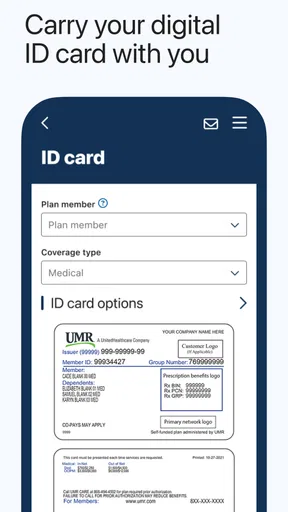
I also like the idea of having benefits information available during a phone call. If I am speaking with a provider's billing office, I can use the app as a reference while taking notes. This is more useful than simply having a digital copy of a card because it supports the surrounding decision process: checking what I know, identifying what I still need to ask, and keeping the conversation organized.
A less obvious strength is that the app can help me become a better question-asker. Health coverage language is easy to misunderstand, and people often call support without knowing which detail is unclear. Reviewing the information first lets me distinguish between a question about eligibility, a question about a provider, and a question about a claim or bill. Even when the app does not settle the issue by itself, it can make the next contact more efficient.
That is an important distinction. I do not view a benefits app as successful only when it gives an instant yes-or-no answer. It is also useful when it helps me arrive at the right human support channel with the relevant context. For complicated cases, that preparation may be more valuable than a polished dashboard.
Small habits that make the app more useful
I would use UMR | Health as part of a simple benefits routine rather than opening it randomly. Before a planned appointment, I would review the account information available to me and note anything that needs clarification. After receiving a bill or explanation of benefits, I would compare the wording with my notes and use the app to organize the next question. This avoids the common mistake of treating a benefits app as a passive document wallet.
I would also avoid assuming that the first screen tells the whole story. Benefits are often conditional, and a summary may not answer a question about a particular service, provider, or personal circumstance. My tip is to read the surrounding details carefully and save the exact wording of anything important in my notes. If a decision involves a meaningful expense, I would verify it through the appropriate official contact rather than relying on an informal interpretation of a screen.
Another useful workflow is to prepare for a support call while the issue is still fresh. I would record the date of a visit, the name of the provider, the amount on a bill, and the question I want answered. Then I would use the app to check the information already available before calling. This turns a vague complaint into a focused request and makes it less likely that I will need several separate conversations.
The app is available to an Everyone audience, which fits its role as a benefits-access tool rather than a mature-content service. It was released on December 1, 2022, and the current version is 2.31.0. Those details matter mainly because account and benefits apps need ongoing maintenance; I would keep it updated through the normal app-store process so I am not judging the experience from an outdated build.
What I would not expect it to do
My biggest caution is about scope. UMR | Health should not be mistaken for a clinical decision tool. I would not use it to diagnose symptoms, decide whether an emergency is serious, or replace advice from a doctor, pharmacist, or other qualified professional. A benefits application can help me understand the administrative side of care, but it cannot evaluate my health.
I would also avoid expecting it to replace every conversation with a provider or plan representative. Coverage questions can depend on details that are difficult to summarize in an app, including the exact service, the provider involved, and the circumstances of care. If the financial consequences are significant, I would treat the app as a starting point and confirm the answer through the official channel connected with my plan.
That limitation is not a flaw unique to this product; it is a trade-off of the category. A focused app can be clearer than a giant healthcare platform, but it may also leave complex cases to customer support. I prefer that honest boundary to an app that gives an overconfident answer where the situation actually requires review.
When another type of tool may fit better
People often compare benefits apps with general health apps, but they solve different problems. A fitness or wellness application may be better for tracking activity, sleep, nutrition, or personal goals. A symptom reference may be more suitable for learning general medical information, although it still should not replace professional care. A provider's own app may be the better choice for appointment scheduling, messages, test results, or treatment-specific communication.
A banking-style personal finance app can also be more helpful when the main problem is budgeting for medical expenses. It may help someone organize payments and household spending, while UMR | Health is more relevant to understanding the benefits side of healthcare. I would not ask one category to perform the other's job. The right choice depends on whether my immediate problem is coverage, clinical communication, wellness tracking, or money management.
There is a genuine trade-off between a dedicated plan app and a broader healthcare portal. A broader portal may gather more services in one place, reducing the number of apps on my phone. On the other hand, a dedicated UMR experience may feel more direct when my question is specifically about UMR benefits. Without inventing features for either side, my rule would be to choose the tool that matches the organization responsible for the information I need.
Someone who changes insurance plans frequently may find a dedicated benefits app less convenient than a neutral document organizer or a broader personal health record. The cost of switching between plan-specific tools is not only storage space. I may need to learn a new layout, sign in again, update saved information, and remember which app contains which document. For a person with one stable UMR connection, that inconvenience may be minor. For someone managing several plans or family members, it deserves more thought.
The real cost of switching
Because UMR | Health is free, the main cost is not the purchase price. The cost is time, attention, and account setup. I would need to install it, sign in, understand where the relevant information lives, and decide whether it fits my existing way of keeping health records. That is a modest investment, but it is still a reason to test the app during a calm period rather than during a billing dispute.
Switching away from paper or a browser can also create a habit problem. If I already know exactly where my plan documents are and rarely need them, the app may not transform my routine. Its advantage becomes clearer when I need access while traveling, when I want to prepare for a call, or when I dislike carrying printed material. In other words, the benefit grows with the number of small administrative moments it simplifies.
I would keep a backup method during the transition. Saving important reference details in a secure place, retaining physical plan information when appropriate, and knowing how to contact support are sensible safeguards. This is not an argument against the app. It is a reminder that healthcare access should not depend on whether one mobile screen happens to load at the right time.
The minimum operating-system requirement is Android 9, so users on older devices should check compatibility before planning around it. For most people with a supported phone, that requirement is unlikely to be the deciding factor, but it is worth checking if the device is several years old or no longer receives regular system updates.
My recommendation for different kinds of users
I recommend UMR | Health to people who have UMR-connected benefits and want a convenient mobile reference for managing the administrative side of care. It is especially sensible for anyone who attends appointments regularly, handles healthcare paperwork for a family, travels with limited access to a computer, or wants to prepare more carefully before contacting a provider or plan representative.
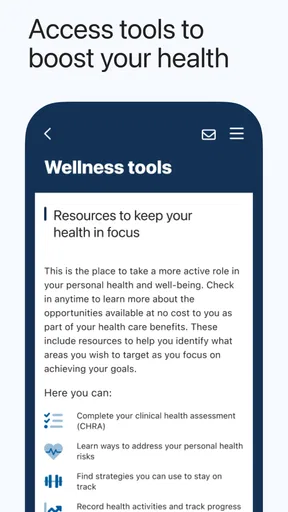
I would be more cautious if I wanted a complete health-management suite. This is not the app I would choose as my only medical resource, and I would not install it expecting wellness tracking, diagnosis, or a substitute for provider communication. People whose coverage is unrelated to UMR should also look first for the official tool associated with their own plan, because relevance matters more than a good general rating.
My final judgment is that the app succeeds by staying practical. Its best use is not constant engagement; it is being available when a benefits question appears. The free price lowers the barrier to trying it, and the Everyone age rating makes its intended audience broad. Just remember that a mobile benefits reference is most reliable as one part of a larger workflow that includes your plan documents, careful questions, and professional guidance when the issue is clinical.
If I were recommending it to a friend, I would say: install it if UMR is part of your coverage, sign in before you need it, and use it to prepare rather than guess. Check the details that matter, keep a backup, and contact the appropriate support channel for complicated or expensive decisions. Used that way, UMR | Health is a useful companion for benefits administration, even though it is not designed to be an all-purpose healthcare app.
Privacy and Permissions
See what permissions an app requests and how it handles your data.
- Photos/Media/Files
- read the contents of your USB storage, modify or delete the contents of your USB storage
- Storage
- read the contents of your USB storage, modify or delete the contents of your USB storage
- Camera
- take pictures and videos
- Microphone
- record audio
- Wi-Fi connection information
- view Wi-Fi connections
- Other
- view network connections, full network access, change your audio settings, run at startup, control vibration, prevent device from sleeping
Verdict
Strengths of UMR | Health
- Provides quick access to personal health information and care resources.
- Useful for managing appointments, prescriptions, and medical communications in one place.
- Can help users stay organized with reminders and health-related updates.
- Designed for convenient access to services from a mobile device.
- May reduce the need for phone calls or in-person administrative visits.
Limitations of UMR | Health
- Some features may require an active UMR insurance plan or member account.
- Availability of services can vary by healthcare provider and insurance coverage.
- Sensitive health data requires careful attention to account security and privacy.
- Certain functions may depend on a stable internet connection.
- Users may need to contact support for complex claims or coverage questions.
Other Releases by UNITED HEALTHCARE SERVICES, INC.
View All
UnitedHealthcare
Medical4.6

NYC Employees PPO Plan
Medical4.7
Similar Picks in This Category
View All
WebMD: Symptom Checker
WebMD, LLC4.1

Microphone Amplifier
DOSA Apps4.2

Anatomy Learning - 3D Anatomy
3D Medical OU4.5

Period Tracker and Calendar
SimpleInnovation4.9

GoodRx: Prescription Coupons
GoodRx4.8

CVS Health
CVS Pharmacy4.5
Frequently Asked Questions
What is UMR | Health, and what can I use it for?
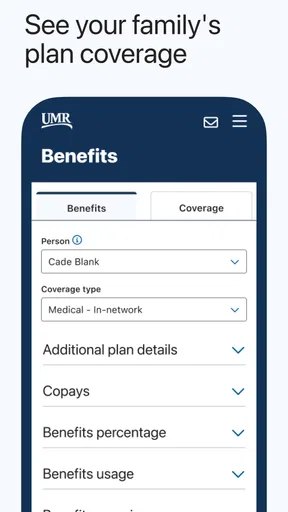
UMR | Health is a mobile health-benefits app designed for eligible UMR members. After signing in, users can typically access plan information, review benefits, search for in-network providers, check claims and coverage details, and view important member resources. The exact features available may depend on your employer-sponsored plan, membership status, and the services supported by UMR in your region.
How do I sign in to the UMR | Health app?
To use UMR | Health, you generally need valid UMR member credentials or an account connected to your health plan. New users may need to register with information from their member ID card before accessing the app. Make sure your details are entered exactly as shown on your plan documents. If you forget your password or cannot verify your identity, use the recovery options or contact UMR support.
Can I use UMR | Health to find doctors, hospitals, or other providers?
Yes, one of the most useful purposes of UMR | Health is helping members locate healthcare providers and facilities associated with their plan network. Search results may include doctors, hospitals, pharmacies, and other services, depending on your benefits. Always confirm that a provider is still in network before receiving care, since network participation and coverage can change.
Can I view claims, benefits, and coverage information in the app?
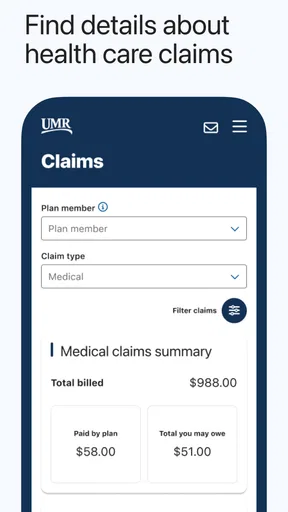
UMR | Health may allow you to review claim activity, benefit details, deductibles, out-of-pocket amounts, and other plan information from your phone. This can make it easier to understand how a medical bill was processed and what amount may be your responsibility. However, displayed information can take time to update, so contact UMR directly if a claim appears incomplete or incorrect.
Is UMR | Health free, and is my personal health information secure?
The UMR | Health app is generally available at no additional download cost for eligible members, although your healthcare plan remains subject to its own premiums, deductibles, copayments, and other charges. Because the app handles sensitive insurance and health-related information, use a strong password, avoid sharing your login, and install updates from the official app store. Availability and privacy features may vary by device and plan.
